Elevate Typography with Nine6brush Procreate Brushes
Digital lettering often hits a plateau when artists rely too heavily on standard toolsets. The difference between a generic digital sketch and a professional-grade typographic piece frequently lies in the texture, flow, and versatility of the brushes used. For iPad Pro users who have already invested in the Procreate application, expanding that toolkit is a logical next step to unlock higher levels of creativity. This is where the Nine6brush Procreate Lettering Brushes collection becomes a vital asset. It is not merely an add-on; it is a comprehensive suite designed to bridge the gap between traditional media feel and digital efficiency, offering lettering artists, calligraphers, and type designers a robust platform to vary their typography work significantly.
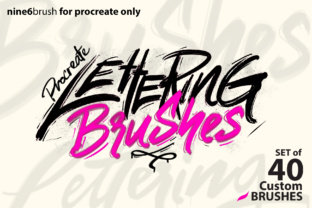
The core value of this collection lies in its sheer diversity. While many brush packs offer slight variations of the same stroke, the Nine6brush set provides a distinct range of textures and behaviors. The package includes two primary sets: the nine6brush set containing 24 custom brushes and the nine6lettering set with 16 custom brushes, totaling 40 unique tools. This volume allows creators to move seamlessly between different stylistic requirements within a single project. Whether you are drafting a rough concept or finalizing a polished logo, having immediate access to styles ranging from Script and Paint to Chalk and Grunge eliminates the need to switch applications or manually create textures in post-production.
Expanding Creative Possibilities Through Texture
One of the most significant challenges in digital art is replicating the organic imperfections of physical media. The Nine6brush Procreate Lettering Brushes address this by including specialized tools like Rope, Wet Paint, Ink, and Ghost. These are not just visual overlays; they interact with the canvas in ways that mimic real-world physics. For a calligrapher, the "Wet Paint" brush can simulate the bleed of ink on paper, adding depth and realism to script work that flat vectors cannot achieve. Similarly, the "Grunge" and "Chalk" options allow marketers and bloggers to create content that feels handcrafted and authentic, a style that often resonates more deeply with audiences than sterile, perfect geometry.
For type designers, the inclusion of niche styles such as Light Trails, Neon, and Sparkling Lamp opens doors for experimental typography. These brushes are particularly useful for creating eye-catching headers for social media campaigns or digital advertisements where standing out is paramount. Instead of spending hours layering effects to achieve a glowing neon look, a user can apply the specific brush stroke directly, saving considerable time while maintaining high fidelity. The collection also features practical tools like Grid and Line brushes, which are indispensable for maintaining structure during the layout phase of a design project, ensuring that creative freedom does not come at the cost of alignment and balance.
Streamlining the Workflow for Professionals
Efficiency is a critical metric for freelancers and small business owners who must balance creative output with tight deadlines. The Nine6brush Procreate Lettering Brushes streamline the workflow by consolidating multiple textural needs into one accessible library. A content creator working on a series of educational graphics can utilize the "Kiddy" brush for playful, approachable headings and switch instantly to a sharp "Signature" brush for authoritative quotes. This versatility reduces the friction of searching for the right tool, allowing the artist to stay in a state of flow.
Moreover, the range of brush sizes, noted as starting from 1.0 up to 16.0 and beyond in various iterations, ensures scalability. Whether working on a detailed icon for a mobile app interface or a large-scale poster print, the brushes adapt to the canvas resolution without losing quality. This scalability supports entrepreneurs who need to repurpose a single design across various platforms, from Instagram stories to website banners, without needing to redraw elements. The ability to maintain consistent texture and style across different formats strengthens brand communication and presentation.
Who Benefits Most from This Collection?
While any digital artist can find value here, specific groups will find the Nine6brush Procreate Lettering Brushes particularly transformative. Lettering artists will appreciate the nuanced control over stroke endings and pressure sensitivity, which is crucial for custom hand-lettering projects. Calligraphers transitioning to digital mediums will find the familiar feel of ink and chalk brushes eases the learning curve, allowing them to translate their traditional skills effectively onto the iPad Pro screen.
Type designers benefit from the variety of weights and textures available for experimenting with new font concepts. The "Transparent" and "Ghost" brushes, for instance, offer unique opportunities for layering and creating complex typographic compositions that play with negative space. Additionally, educators and publishers creating instructional materials can use the diverse styles to differentiate between headings, body text, and annotations, making content more engaging and easier to navigate for students or readers.
Practical Installation and Usage Guidelines
To fully leverage the capabilities of these tools, proper installation is essential. The process is straightforward but requires attention to detail to ensure the files integrate correctly with the Procreate application. Users should begin by downloading the brushes file. Since the file is compressed, you will need to extract the .zip file. This can be done on a computer or directly on the iPad using an app like iZip.
Once extracted, save the results to a cloud storage service like Dropbox or Google Drive, or keep them in the iPad's Files app. Navigate to the location where you saved the file within the Files app and tap on it. Procreate should detect the file type automatically and import the brush set into its own dedicated section within the brush library. It is crucial to note a common pitfall: DO NOT use the "Import" function located within the Procreate brushes panel. That function is designed only for individual .brush files and does not support .brushset files. If attempted, the file will appear greyed out, causing unnecessary confusion. By tapping the file directly in the Files app, the entire collection imports seamlessly, ready for immediate use.
Considerations for Optimal Results
While the Nine6brush Procreate Lettering Brushes offer extensive utility, users should consider their specific project needs before diving in. These brushes are optimized for the iPad Pro and the Procreate ecosystem; they are not compatible with desktop vector software like Adobe Illustrator without rasterization. Therefore, if a project requires infinite scalability for large-format printing, users may need to combine these textured strokes with vector outlines or work at sufficiently high resolutions from the start.
Furthermore, the effectiveness of brushes like "Wet Paint" or "Ink" depends heavily on the user's familiarity with pressure sensitivity settings on the Apple Pencil. Beginners may need to spend time adjusting the streamline and pressure curves in Procreate to match their hand movement to the brush behavior. However, this initial investment in customization pays off by providing a tailored experience that feels natural and responsive.
In conclusion, integrating the Nine6brush Procreate Lettering Brushes into your digital arsenal offers a practical solution for enhancing typographic variety and efficiency. By providing 40 distinct styles ranging from the playful to the professional, this collection empowers creators to solve visual problems with greater ease and flair. Whether you are refining a brand identity, creating engaging social content, or exploring new artistic horizons, these tools provide the necessary foundation to elevate your work from simple digital drawings to compelling visual communication.