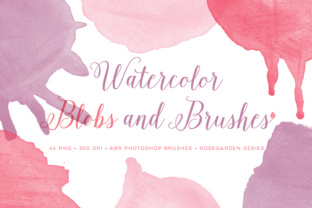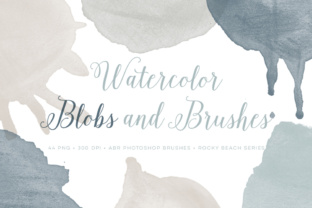
Watercolor Blobs PS Brushes Plus Bonus: Authentic Digital Art
Creating digital art that feels organic and hand-crafted can be a challenge. Often, standard software tools produce lines that look too perfect, too rigid, or distinctly "computer-generated." This is where Watercolor Blobs PS Brushes Plus Bonus changes the game for creators of all skill levels. This collection is not just a set of stamps; it is a carefully curated toolkit designed to bring the fluid, unpredictable beauty of traditional watercolor painting directly into your Adobe Photoshop workspace. Whether you are a seasoned graphic designer looking to add texture to a client project or a hobbyist wanting to create beautiful greeting cards, these brushes offer an authentic solution without the mess of real paint.
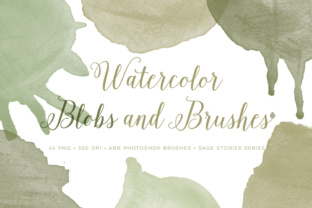
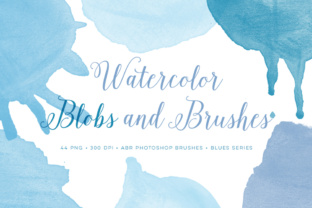
The core appeal of this set lies in its origin. Unlike many digital assets that are generated algorithmically, every graphic in this collection was hand painted. This means each blob, splatter, and wash retains the natural imperfections, edge variations, and pigment density that occur when real water meets real paper. When you apply these brushes, you aren't just placing a flat image; you are introducing a piece of genuine artistic expression into your design. The result is a level of depth and realism that is difficult to achieve with standard synthetic brushes.
High-Resolution Quality for Professional Results
One of the most critical factors for any digital asset is resolution, and this set delivers exceptional clarity. All graphics are provided at a crisp 300 DPI (dots per inch). In the world of print and high-quality digital display, 300 DPI is the gold standard. It ensures that your artwork remains sharp and detailed, whether it is being viewed on a retina display or printed on a large poster. There is nothing more frustrating than designing a beautiful piece only to find it looks pixelated or blurry when exported. With these brushes, that concern is eliminated.
The file sizes are generous, offering substantial flexibility for your compositions. The files are sized around 4 inches wide and tall, with some designs reaching closer to 6 inches at 300 DPI. This scale allows you to use the blobs as major focal points in a layout or scale them down for subtle background textures without losing quality. Because they are so large, you have the freedom to crop, rotate, and manipulate them to fit specific spaces in your design while maintaining their integrity.
What Is Included in the Package
When you acquire Watercolor Blobs PS Brushes Plus Bonus, you receive a versatile dual-format package designed to work seamlessly with your workflow. The download includes:
- 11 ABR Brush Files: These are native Adobe Photoshop brush files. Once installed, they function like any other brush in your toolbar, allowing you to paint with pressure sensitivity (if using a tablet) and blend modes for dynamic effects.
- 44 PNG Files: For those who prefer drag-and-drop simplicity or use software other than Photoshop, the set includes high-resolution PNGs. These cover all 11 unique designs, each available in 4 different colors.
The inclusion of both formats is a significant value add. The ABR files are perfect for building up layers and creating custom strokes, while the PNGs are ideal for quick composition, mockups, or adding instant watercolor accents to photos and layouts without needing to configure brush settings.
Ideal Uses for Creators and Businesses
The versatility of this watercolor set makes it suitable for a wide range of applications across personal, professional, and educational contexts. Here are a few practical ways you can utilize these tools:
Branding and Marketing Materials
Small business owners and marketers often struggle to make their brands feel approachable and human. Corporate aesthetics can sometimes feel cold. By incorporating these hand-painted watercolor blobs into logos, social media graphics, or website headers, you can instantly soften your brand identity. They work exceptionally well for boutiques, cafes, wellness coaches, and creative agencies that want to convey warmth and authenticity.
Invitations and Stationery
If you are a freelancer designing wedding invitations, birthday cards, or event programs, these brushes are indispensable. The organic shapes mimic the popular "watercolor wash" background trend seen in modern stationery. You can layer the different colors and opacity levels to create unique backdrops that look like they were painted by hand, saving you hours of manual painting time while delivering a premium product to your clients.
Educational Resources and Presentations
Educators and content creators can use these elements to make learning materials more engaging. Textbooks, worksheets, and slide decks often benefit from visual breaks that are friendly and inviting. Using these watercolor shapes to highlight key terms, frame images, or separate sections can make dense information feel more digestible and visually appealing to students of all ages.
Digital Scrapbooking and Journaling
For hobbyists involved in digital planning or scrapbooking, this set provides essential decorative elements. The 44 PNG files allow for rapid assembly of pages, letting you focus on the storytelling aspect of your journal rather than spending time creating background elements from scratch.
Compatibility and Ease of Use
A common concern when downloading new assets is compatibility. Rest assured, Watercolor Blobs PS Brushes Plus Bonus was made for Adobe CS and up. This broad compatibility ensures that whether you are running an older version of Creative Suite or the latest subscription-based Creative Cloud, these tools will integrate smoothly into your environment. Installing the ABR files is a straightforward process typically involving a double-click of the file or loading them through the Brush panel in Photoshop.
For beginners who might feel intimidated by the concept of "brushes," the included PNG files offer a gentle entry point. You can simply open a PNG in Photoshop, drag it onto your canvas, and start designing immediately. No technical knowledge of brush dynamics or pressure settings is required to get great results with the PNGs.
Things to Consider Before You Start
While these brushes are powerful, getting the best results requires a bit of understanding about how digital watercolor works. First, remember that these are simulations of wet media. To maximize their potential, experiment with Photoshop's blending modes. Setting a layer to "Multiply" can make the watercolor look like it is soaking into the paper beneath it, while "Overlay" or "Soft Light" can create vibrant, glowing effects.
Additionally, because the original graphics were hand-painted, each of the 11 designs has a unique character. Some may be denser and more opaque, while others are light and airy. Take a moment to review all 11 designs in the 4 provided colors to understand the range of textures available to you. Don't be afraid to recolor the black-and-white versions of the brushes using Photoshop's "Color Overlay" layer style if you need a specific shade that isn't included in the default four colors.
Ultimately, Watercolor Blobs PS Brushes Plus Bonus offers a bridge between the tactile joy of traditional painting and the efficiency of digital design. It solves the problem of sterile, perfect digital lines by injecting soulful, human-made texture into your projects. With high-resolution files, broad compatibility, and a mix of usable formats, it is a practical investment for anyone looking to elevate their visual content with an authentic watercolor look.