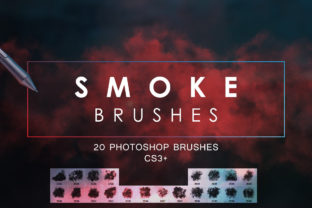
20 Smoke Photoshop Brushes for Dynamic Designs
Digital design often struggles with the challenge of adding organic movement to static compositions. While geometric shapes and sharp vectors have their place, there is a distinct need for elements that feel fluid, atmospheric, and alive. This is where the 20 Smoke Photoshop Brushes collection becomes an indispensable tool for creators who want to elevate their visual storytelling. Whether you are crafting a moody album cover, designing a high-impact flyer, or simply looking to add depth to a social media banner, these brushes provide the texture and flow necessary to break the rigidity of digital grids.
The core value of this pack lies in its versatility. It includes twenty unique smoke variations, each offering a different density, swirl pattern, and dispersion rate. Unlike generic overlays that can look flat or repetitive, these brushes are fully customizable. Because they function as dynamic brush tips rather than static stamps, you have complete control over the outcome. You can adjust the size, opacity, flow, and scattering parameters within Photoshop to achieve results that perfectly match your specific project needs. Furthermore, the inclusion of a version compatible with CS5 and lower ensures that freelancers and hobbyists working on older hardware or legacy systems are not left behind, making professional-grade effects accessible to a wider range of users.
Expanding Creative Possibilities Beyond Standard Effects
When integrating 20 Smoke Photoshop Brushes into your workflow, the immediate application might seem obvious: adding fog to a landscape or steam to a coffee cup. However, the true potential of these tools emerges when you use them to manipulate mood and direct the viewer's eye. Smoke is inherently ephemeral; it suggests mystery, transition, and energy. By strategically placing these wisps of vapor, you can create leading lines that guide attention toward a call-to-action button on a landing page or highlight a product in a commercial advertisement.
Consider the application in portrait photography. A subtle overlay of smoke can transform a standard headshot into an editorial masterpiece. By masking the smoke around the subject's silhouette, you create a separation from the background that adds three-dimensional depth without requiring complex lighting setups during the shoot. For marketers and small business owners, this technique is particularly useful for creating branded content that stands out in crowded feeds. A well-placed swirl of smoke can frame a logo or text, giving it a premium, ethereal quality that resonates with audiences looking for sophistication.
The variety within the pack allows for stylistic experimentation. Some brushes in the set offer thick, billowing clouds suitable for dramatic, heavy atmospheres, while others provide thin, delicate trails ideal for subtle enhancements. This range means you are not forced into a single aesthetic. You can mix and match different brushes within the same composition to build complex layers of atmosphere. For instance, combining a dense base layer with finer, scattered top layers can mimic the natural behavior of rising heat, resulting in a photo effect that feels authentic rather than digitally pasted.
Practical Applications Across Platforms and Formats
The adaptability of these brushes makes them suitable for a vast array of formats, from print templates to digital screens. For designers creating wallpapers for iPhone or iPad, the ability to customize brush parameters is crucial. Screen real estate is limited, and a heavy-handed effect can obscure icons or text. With these brushes, you can dial down the opacity and scale the smoke to fit the negative space of a mobile interface, creating a background that is visually interesting but functionally unobtrusive.
In the realm of social media, specifically for Facebook covers and YouTube backgrounds, consistency is key. These platforms often require imagery that spans wide aspect ratios. The 20 Smoke Photoshop Brushes allow you to stretch and distort the smoke patterns to fill these wide canvases without losing resolution or looking pixelated. You can create a cohesive brand identity by using a signature smoke style across all your channel art. For example, a gaming channel might use aggressive, dark smoke trails to convey intensity, while a wellness blogger might opt for lighter, white wisps to suggest calmness and clarity.
Print media also benefits significantly from this resource. When designing flyers for events, concerts, or product launches, texture is what separates amateur designs from professional ones. Smoke adds a tactile quality to printed materials, even though it is viewed visually. It breaks up large blocks of color and provides a dynamic backdrop for typography. Because the brushes are high-resolution and scalable, they remain crisp when printed on large format posters or brochures. The CS5 compatibility ensures that print shops running older versions of Adobe software can still utilize these assets without compatibility errors.
Tailoring Techniques for Different Audiences
Different users will approach the 20 Smoke Photoshop Brushes with varying goals, and understanding how to adapt the tool to your specific audience is essential for effective design.
- Freelancers and Agencies: Speed and customization are your priorities. Use the preset variations as a base, then quickly tweak the dynamics to meet tight client deadlines. The ability to save your customized settings as new presets can streamline your workflow for recurring projects.
- Photographers: Focus on blending modes. Experiment with 'Screen', 'Overlay', or 'Soft Light' to integrate the smoke naturally into your existing photos. The goal is enhancement, not obstruction; the smoke should complement the lighting direction of the original image.
- Educators and Students: This pack serves as an excellent teaching tool for understanding layers and masking. It allows students to practice non-destructive editing, learning how to refine edges and control transparency to achieve realistic composites.
- Entrepreneurs: Use these brushes to create distinct visual assets for advertising campaigns. A unique smoke effect can become part of your brand's visual language, making your ads instantly recognizable amidst competitors.
To keep your results clear and effective, organization is vital. When working with multiple smoke layers, name your layers descriptively (e.g., "Base Fog," "Highlight Wisps") and group them logically. This practice not only helps you manage complex compositions but also ensures that if you need to revisit the file months later, the structure remains intuitive. Consistency in your application of these effects will also help maintain a professional look. Avoid overusing the effect; sometimes, a single, well-placed trail of smoke is more powerful than a canvas filled with fog.
Originality comes from how you manipulate the default settings. Do not rely solely on the brush as it appears upon installation. Change the angle, adjust the spacing, and vary the pressure sensitivity if you are using a graphics tablet. These small adjustments ensure that your work does not look like it came from a standard template. By treating the 20 Smoke Photoshop Brushes as a starting point for experimentation rather than a final solution, you unlock their full potential.
Ultimately, this collection is about empowering you to add life to your digital creations. Whether you are designing a sleek YouTube background, a gritty concert flyer, or a serene mobile wallpaper, these tools provide the flexibility and quality needed to execute your vision. The combination of modern compatibility and legacy support ensures that no matter your setup, you can access these creative resources. Embrace the fluidity of smoke to bring movement, depth, and emotion to your next project, transforming simple concepts into compelling visual experiences.