Bringing Raw Texture to Digital Design with Inspecture
In the polished, vector-perfect world of modern digital design, there is a growing hunger for imperfection. We see it in the rise of brutalist web layouts, the return of grainy photography, and the widespread adoption of typography that feels like it was pulled straight from a sketchbook. This shift represents a desire for authenticity—a way to cut through the sterile noise of corporate minimalism and connect with audiences on a more human level. Enter Inspecture, a typeface that masterfully bridges the gap between digital precision and organic chaos.
Inspecture is not just another font file you download and forget; it is a design tool specifically engineered to replicate the rough, unpredictable nature of hand-brushed strokes. When you place this typeface on a canvas, it doesn't just sit there; it interacts with the white space around it, bringing a tactile quality that flat sans-serifs simply cannot achieve. For designers working across branding, packaging, social media, and editorial layouts, understanding how to leverage such a distinct voice is crucial for creating work that stands out.
The Aesthetic of Authenticity
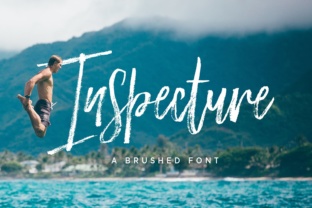
The primary appeal of Inspecture lies in its ability to mimic the physical act of painting or lettering. Unlike standard brush fonts that often rely on repetitive ligatures to simulate connection, this typeface embraces the jagged edges and varying densities of a real bristle brush hitting paper. The result is a look that is simultaneously casual and bold. It carries an energy that suggests movement, urgency, and creativity.
Consider the psychological impact of texture. When a viewer sees a clean, geometric font, they perceive stability and order. However, when they encounter the rough strokes of Inspecture, the brain registers something handmade. This triggers a sense of approachability. It tells the story of a brand or a project that values craft over mass production. In an era where consumers are increasingly skeptical of overly curated marketing, this "rough around the edges" aesthetic can build trust and engagement.
The font's character is defined by its high contrast and irregular terminals. Some strokes are thick and heavy, anchoring the letters, while others taper off into fine, frayed points. This variation creates a dynamic rhythm within words and headlines, guiding the eye naturally across the text. It is this specific interplay of light and dark, smooth and rough, that makes Inspecture such a versatile asset for adding texture and appeal to diverse design projects.
Strategic Applications in Modern Workflows
Knowing when to use a display font is just as important as knowing how to use it. Because Inspecture is a display typeface with significant visual weight, it is not intended for long-form body copy. Instead, it shines in scenarios where immediate impact is required. Here are several practical ways to integrate it into your current workflow:
- Brand Identity Logos: For startups in the lifestyle, food and beverage, or creative industries, a logo set in Inspecture can instantly communicate a boutique, artisanal vibe. It works particularly well for coffee shops, craft breweries, and streetwear labels.
- Social Media Graphics: In the fast-scrolling environment of Instagram and TikTok, static images need to pop. Using Inspecture for quote cards, event announcements, or sale banners adds a layer of visual interest that stops the scroll.
- Packaging Design: Physical products benefit immensely from tactile typography. When printed on kraft paper, textured cardstock, or matte finishes, the rough edges of the font enhance the sensory experience of unboxing.
- Poster and Event Promotion: Concert flyers, workshop posters, and festival lineups often require a sense of energy and rebellion. The bold strokes of this font capture that spirit perfectly without needing excessive graphical embellishments.
Integrating Inspecture into a project often requires a shift in composition strategy. Because the letters have such strong personalities, they demand breathing room. Crowding them with other busy elements can dilute their impact. A best practice is to pair Inspecture with a very neutral, clean sans-serif or a simple monospace font for secondary information. This contrast allows the brush strokes to take center stage while ensuring readability for details like dates, prices, or addresses.
Navigating Technical Considerations
While the aesthetic benefits of Inspecture are clear, practical implementation does come with considerations. The very features that make it beautiful—the rough edges and irregular shapes—can pose challenges if not handled correctly. One common issue is legibility at small sizes. The fine, frayed details that look stunning in a large headline can disappear or turn into visual noise when scaled down below 24 points. Therefore, it is highly recommended to reserve this font for headings, titles, and short phrases where it can be displayed prominently.
Furthermore, color choice plays a pivotal role in how the font renders. Solid black on a white background is the classic approach, but Inspecture truly comes alive when experimented with. Trying the font in deep navy, forest green, or even a vibrant orange can change the entire mood of the design. Some designers even apply subtle gradients or overlay textures (like paper grain) directly onto the glyphs to further enhance the hand-painted illusion. However, caution is advised; adding too many effects can muddy the crispness of the brush strokes.
Another factor to consider is the context of the medium. On high-resolution screens and professional print presses, the detail in Inspecture will render sharply. However, on low-resolution displays or poor-quality prints, those delicate rough edges might blur. Always test your designs across different mediums before finalizing. If the output medium is limited, you may need to increase the tracking (letter-spacing) slightly to prevent the rough edges of adjacent letters from touching and creating illegible clumps.
Elevating the Creative Process
Adopting a font like Inspecture is more than a stylistic choice; it is a workflow enhancer. In many design projects, creators spend hours creating custom brushes in Photoshop or Illustrator to achieve a specific hand-lettered look. This process is time-consuming and often yields inconsistent results. By utilizing a high-quality brush font, designers can bypass the tedious setup phase and jump straight into composition. The consistency of the character set ensures that every "A" or "T" maintains the same stylistic DNA, providing a cohesive look that manual lettering might struggle to achieve over long passages.
Moreover, Inspecture encourages experimentation. Because it feels so organic, it invites designers to break grid systems and play with rotation, overlapping, and unconventional alignment. It serves as a reminder that digital design does not always have to be rigid. It empowers creatives to inject a bit of soul into their work, transforming a standard layout into something that feels curated and personal.
Ultimately, the value of Inspecture extends beyond its visual attributes. It represents a tool for storytelling. Whether you are designing a campaign for a non-profit, launching a new product, or creating content for a personal blog, the right typography sets the tone. Inspecture speaks the language of creativity, boldness, and human touch. In a digital landscape saturated with perfection, choosing a font that celebrates the rough, the raw, and the real is a smart way to ensure your message is not just seen, but felt.
As you explore your next design project, consider whether your message needs the polish of a corporate sans-serif or the heartbeat of a brush stroke. If the latter resonates with your goals, Inspecture offers a robust, flexible, and undeniably stylish solution. It stands ready to transform flat pixels into textured experiences, proving that sometimes, the most effective way to move forward is to embrace a little bit of roughness.