Evaluating the Banners Photoshop Brushes and Bonus Blue Files for Professional Design Work
In the landscape of digital design, efficiency often dictates the success of a project. Whether you are a freelance graphic designer managing tight deadlines, a small business owner creating social media assets, or a scrapbooking enthusiast documenting memories, the quality of your raw materials matters. The Banners Photoshop Brushes and Bonus Blue Files represents a specific utility within this ecosystem, offering a curated collection of hand-painted elements designed to streamline the creation of banners, ribbons, and decorative headers. This analysis examines the practical value, technical specifications, and real-world application of this asset pack to determine its fit for various creative workflows.
Core Components and Technical Specifications
At its foundation, this package is divided into two distinct but complementary components: a set of dynamic brush tools and a library of pre-rendered image files. Understanding the distinction between these two formats is crucial for maximizing their utility in Adobe Photoshop.
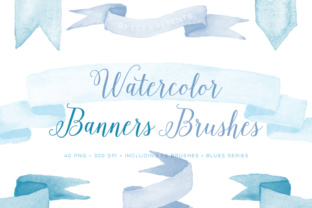
The primary feature is the inclusion of 10 different paint stroke designs. These are not static images but functional .ABR (Adobe Brush) files. Technically, these brushes are engineered to simulate the texture and variability of traditional media. When applied, they generate large-scale strokes that mimic the look of hand-painted ribbons or banners. A significant advantage here is the compatibility; the package includes versions specifically optimized for both Photoshop CS and Photoshop CC. This dual-version approach ensures that users operating on older, stable enterprise systems can utilize the tools just as effectively as those on the latest subscription-based software, removing a common barrier to entry for many professionals.
Complementing the brushes is the "Bonus Blue Files" segment. This consists of 40 PNG images, organized into 10 unique banner designs, each available in four variations within a cohesive blue palette. Unlike the brushes, which require user input to generate the shape, these PNGs are ready-to-use assets. They come with transparent backgrounds, allowing for immediate layering over photographs, solid colors, or complex textures without the need for manual masking or extraction.
Aesthetic Quality and the Hand-Painted Appeal
The visual philosophy behind the Banners Photoshop Brushes and Bonus Blue Files centers on the "hand-painted touch." In an era where vector graphics and flat design often dominate corporate branding, there is a growing demand for organic, human-centric aesthetics. These assets deliver on that front by introducing irregularity and texture that rigid geometric shapes lack.
The brush strokes possess a natural weight and flow. They avoid the repetitive, stamped look that plagues lower-quality brush sets. Instead, they offer the kind of variation one would expect from a physical brush loaded with acrylic or watercolor. This makes them particularly effective for projects requiring a sense of authenticity or warmth. The accompanying PNG files maintain this aesthetic consistency. The blue palette chosen for this set is versatile; it ranges from deep, trustworthy navies suitable for corporate communications to lighter, airy shades appropriate for lifestyle blogs or event invitations. This color consistency allows designers to maintain a unified brand voice across different deliverables without spending hours color-grading individual elements.
Practical Applications Across Industries
The versatility of this toolset extends beyond simple decoration. Its application varies significantly depending on the user's profession and goals.
- Branding and Marketing: For marketers and entrepreneurs, these brushes serve as excellent tools for creating unique social media headers, email newsletter dividers, or promotional sale tags. The hand-painted style can soften a brand's image, making it appear more approachable and less sterile.
- Web Design and Blogging: Bloggers and publishers can utilize the PNG ribbons to highlight key quotes, create "featured post" badges, or design custom call-to-action buttons. The transparency of the files ensures they integrate seamlessly into existing website layouts.
- Print and Scrapbooking: The high resolution of the assets makes them viable for print media. Educators creating classroom materials, or hobbyists designing greeting cards and scrapbook pages, will find the large size of the paint strokes sufficient for high-quality printing without pixelation.
- Product Packaging: Small business owners selling handmade goods can use these elements to design labels or packaging inserts that convey a artisanal, boutique quality.
Workflow Efficiency and Usability
From a workflow perspective, the combination of brushes and pre-made PNGs offers a balanced approach to speed and customization. When time is of the essence, the 40 PNG files allow for rapid deployment. A designer can drag, drop, and position a banner in seconds. This is invaluable during brainstorming sessions or when mocking up concepts for client approval.
Conversely, the Photoshop brushes provide flexibility when a specific shape or length is required that the pre-made files cannot accommodate. Because the strokes are generated dynamically, the user can curve them, stretch them, or alter their opacity to fit unique layout constraints. The fact that the designs are "sized pretty big" is a notable usability feature. Large source assets allow for significant scaling down without loss of detail, ensuring crisp edges even on high-DPI displays or large format prints.
However, users should be aware of the learning curve associated with brush dynamics. To get the most out of the .ABR files, one must understand how to adjust settings like flow, opacity, and pen pressure (if using a tablet). While the default settings yield good results, tweaking these parameters can unlock further stylistic possibilities. The PNGs, while convenient, are fixed in shape. If a project requires a banner that curves in a specific, non-standard way, the user may need to rely on the brush tool or employ Photoshop's warp tools on the PNG, which could introduce minor quality degradation if overused.
Long-Term Value and Ecosystem Integration
The true value of the Banners Photoshop Brushes and Bonus Blue Files lies in its reusability. Unlike a single-use template, these assets are building blocks. The 10 core designs can be recolored using Photoshop's adjustment layers (such as Hue/Saturation or Color Overlay) to match virtually any brand guideline, extending the life of the purchase far beyond the initial blue theme. This adaptability transforms the set from a niche product into a staple resource.
Furthermore, the mention of matching graphics and brushes available in the same shop suggests an expandable ecosystem. For agencies or prolific creators, building a library of compatible assets ensures visual consistency across a wide range of projects. Knowing that additional colors or complementary textures are available reduces the friction of sourcing new materials for future campaigns.
Final Assessment
The Banners Photoshop Brushes and Bonus Blue Files stands out as a pragmatic resource for creatives who value both speed and aesthetic depth. It successfully bridges the gap between the convenience of pre-made assets and the creative control of custom brushwork. The inclusion of both CS and CC compatible files demonstrates a thoughtful consideration of the diverse user base, while the high-resolution PNGs ensure professional output quality.
While the fixed color palette of the bonus files may require minor post-processing for some strict brand requirements, the underlying quality of the textures and the flexibility of the brush engine make this a worthwhile investment. For professionals seeking to inject a human, organic feel into their digital compositions without sacrificing workflow efficiency, this set offers a reliable and effective solution. It is less about flashy features and more about providing solid, dependable tools that perform consistently in a production environment.