Evaluating the Photoshop Brushes Alphabet and Green Bonus Set of Graphics for Hand-Painted Design Projects
For graphic designers, digital scrapbookers, and branding specialists, the choice between vector-based typography and rasterized brush strokes often defines the emotional tone of a project. When seeking to inject a human, organic feel into digital compositions, many professionals turn to specialized toolsets like the Photoshop Brushes Alphabet and Green Bonus Set of Graphics. This resource is not merely a collection of letterforms; it is a curated system designed to bridge the gap between traditional hand-painting techniques and modern digital workflows. Understanding the specific utility, technical constraints, and creative potential of this set is essential for determining whether it aligns with your current design requirements or if an alternative approach would yield better results.
Defining the Asset: Structure and Composition
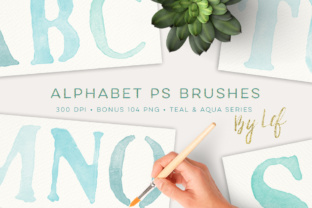
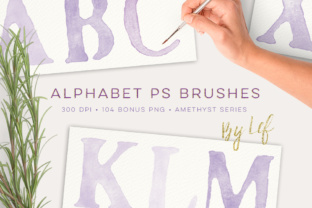
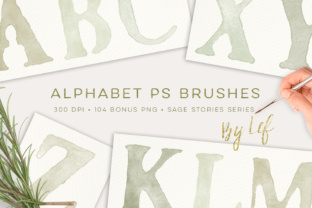
The core value of the Photoshop Brushes Alphabet and Green Bonus Set of Graphics lies in its dual-format delivery. Unlike standard font files that offer infinite scalability but often lack textural depth, this set provides two distinct methods of application. First, it includes a single .ABR brush file containing the entire alphabet. These brushes are engineered to be approximately 1000 pixels tall at 300 DPI, ensuring high-resolution output suitable for print media. Second, the package includes a substantial bonus set of 104 PNG files. These pre-rendered images cover the full alphabet across four distinct color variations within the "Sage Stories" palette, offering immediate usability without the need for manual coloring.
The inclusion of the Sage Stories palette is a significant differentiator. While many brush sets provide only black or grayscale strokes, requiring the user to apply complex layer styles or clipping masks to achieve color, this set offers ready-to-use green tones that evoke nature, growth, and calmness. This makes it particularly distinct for projects targeting eco-friendly brands, botanical illustrations, or wellness-oriented marketing materials. However, for users whose brand guidelines demand specific corporate colors outside the green spectrum, the availability of alternative color sets in the creator's shop becomes a relevant factor in the purchasing decision.
Technical Compatibility and Workflow Integration
One of the most practical aspects of evaluating any digital asset is its compatibility with existing software environments. The Photoshop Brushes Alphabet and Green Bonus Set of Graphics boasts impressive backward compatibility. The brush files are optimized to function with Photoshop CS2 and newer versions, as well as Photoshop 7.0 and potentially even earlier iterations. This is largely because the individual brush tips remain under the 2500-pixel limit imposed by older software architectures. For professionals maintaining legacy systems or working on older hardware where the latest Creative Cloud subscriptions are not feasible, this level of support is a considerable advantage over many modern assets that require CC 2020 or later.
However, users must weigh the benefits of this broad compatibility against the limitations of raster-based brushes. Since these are pixel-based tools rather than vector shapes, they do have a maximum resolution ceiling. At 300 DPI and roughly 1000 pixels in height, the letters are perfectly suited for standard print sizes like invitations, business cards, and social media graphics. If your project involves large-format signage or billboard advertising where letters need to be scaled to several feet tall, you may encounter pixelation. In such scenarios, a vector-based alphabet font or an SVG kit would be a more appropriate technical choice, despite lacking the immediate textured look of these brushes.
Comparative Analysis: Brushes vs. Fonts vs. Vector Sets
When deciding whether to utilize the Photoshop Brushes Alphabet and Green Bonus Set of Graphics, it is helpful to compare it against other common typographic resources. Standard OpenType fonts offer unparalleled flexibility; they allow for kerning adjustments, ligatures, and instant editing of text content. If you are typesetting a long document or need to frequently change copy, a font is undoubtedly the superior tool. Brushes, by contrast, are generally applied stroke-by-stroke or as individual stamp instances. While some advanced brush setups allow for typing, the texture and spacing often require manual tweaking to look natural. Therefore, this brush set is best reserved for headlines, logos, and short phrases where visual impact outweighs the need for rapid text editing.
Compared to vector illustration packs, which offer crisp edges at any size, this brush set trades scalability for authenticity. Vector alphabets can sometimes appear too clean or sterile, lacking the subtle imperfections that signal a "hand-made" origin. The brush strokes in this set capture the variability of paint application, including edge roughness and density changes. For branding projects aiming to convey artisanal quality or personal touch, these imperfections are features, not bugs. Yet, for minimalist, tech-focused, or ultra-modern designs that rely on geometric precision, the organic nature of these brushes might introduce unwanted visual noise.
Ideal Use Cases and Application Scenarios
The versatility of the Photoshop Brushes Alphabet and Green Bonus Set of Graphics shines in specific contexts where atmosphere is paramount. In the realm of digital scrapbooking, the ability to drag and drop high-quality PNGs from the bonus set allows for rapid layout construction. The Sage Stories palette integrates seamlessly with floral papers and nature photography, reducing the time spent on color correction. Similarly, for greeting card design, the hand-painted aesthetic adds a layer of warmth that resonates emotionally with recipients. A wedding invitation featuring these green-hued letters can evoke a garden or rustic theme more effectively than a standard script font.
In branding and identity work, these tools are excellent for creating logo marks for small businesses, particularly those in the organic food, skincare, or sustainable fashion sectors. The 104 PNG files serve as a quick-start library for mood boards or initial concept presentations, allowing designers to visualize how the alphabet interacts with other brand elements before committing to custom lettering. Furthermore, the .ABR file enables the creation of custom wordmarks where specific letter spacing and overlapping can be manually adjusted to create a unique monogram that a standard font could not achieve.
Limitations and Decision Factors
Despite its strengths, potential users must acknowledge certain trade-offs. The primary limitation is the fixed color palette of the bonus PNGs. While the Sage Stories green tones are beautiful, they are not universal. If your project requires a vibrant red or a deep navy, you cannot simply recolor the PNGs without potentially losing the nuanced shading and texture of the original brush stroke. In such cases, using the .ABR brush file on a new layer and painting with your desired foreground color is the necessary workflow, which requires more time and skill than simply placing a PNG.
Additionally, the learning curve for brush alphabets can be steeper than for fonts. Achieving consistent baseline alignment and uniform spacing often requires manual intervention. Users accustomed to the automatic justification tools in text layers may find the process of stamping individual letters tedious for longer words. Therefore, this set is less ideal for body copy or paragraphs and is strictly optimized for display typography.
Making the Right Choice for Your Project
Ultimately, the decision to adopt the Photoshop Brushes Alphabet and Green Bonus Set of Graphics should depend on the specific aesthetic goals and technical constraints of your project. If you prioritize speed and need immediate access to a cohesive, nature-inspired color scheme for short-form content, the included PNG bonus set offers exceptional value. If you require deep customization, high-resolution scalability for massive prints, or the ability to edit text dynamically, you may need to supplement this tool with vector assets or standard fonts.
For designers operating on older versions of Photoshop, the confirmed compatibility with CS2 and PS 7.0 removes a significant barrier to entry, making this a rare and valuable resource in an era of rapidly obsolescing file formats. By understanding both the artistic potential of the hand-painted texture and the technical realities of raster graphics, you can effectively leverage this set to enhance your creative output without falling prey to mismatched expectations. Whether used for a standalone logo, a scrapbook page, or a branded social media campaign, this toolkit provides a robust foundation for adding a genuine human touch to digital designs.