Unlocking Creative Potential with Colorful Vector Arrows PS Brushes
In the vast ecosystem of digital design, few elements are as versatile and universally understood as the arrow. It is a symbol of direction, movement, progress, and guidance. However, finding the right arrow asset that balances professional quality with a touch of whimsical charm can often feel like searching for a needle in a haystack. This is where the Colorful Vector Arrows PS Brushes collection steps in to bridge the gap between rigid corporate graphics and playful, hand-drawn aesthetics. When you first glance at this set, the immediate reaction might be, "That's a lot of arrows." And you would be absolutely right. This comprehensive pack offers a robust toolkit designed to elevate everything from simple social media posts to complex branding projects.
Beyond the Standard Clipart: A Hand-Drawn Approach
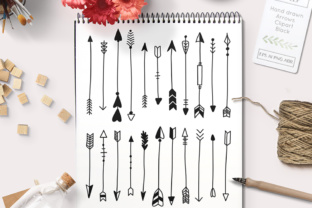
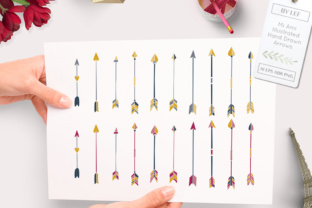
The digital marketplace is saturated with generic, geometric arrow icons that often lack personality. They serve a function, but they rarely evoke an emotion. The defining characteristic of the Colorful Vector Arrows PS Brushes is their origin story: they began as hand-drawn sketches before being meticulously illustrated and digitized. This process imbues each stroke with a human touch that vector software alone struggles to replicate authentically.
There are 20 unique designs included in this set, each offering a distinct flavor. Some curve gently, suggesting a leisurely pace or a creative detour, while others point sharply, demanding immediate attention or indicating a critical step in a process. The inclusion of vibrant colors right out of the box saves designers hours of manual coloring and shading, allowing for immediate integration into projects that require a pop of energy. Whether you are a seasoned graphic designer or a small business owner managing your own marketing, these brushes eliminate the friction of creating custom assets from scratch.
The Technical Breakdown: What You Actually Get
Understanding the file formats included in a design resource is crucial for determining its compatibility with your workflow. This collection is notable for its versatility, catering to both raster-based and vector-based workflows. Upon downloading, users receive a comprehensive package containing:
- 20 PNG files: High-resolution images with transparent backgrounds, perfect for quick drag-and-drop usage in presentations, web design, or documents where Photoshop is not available.
- 2 ABR files: These are the native Photoshop Brush files. Installing these allows you to paint with the arrows directly onto your canvas, adjusting size, opacity, and flow just like a traditional brush. This is ideal for creating organic patterns or integrating the arrows seamlessly into textured backgrounds.
- 1 AI file: The Adobe Illustrator source file ensures that every arrow remains fully editable as a vector. You can change colors, adjust anchor points, and scale the graphics to any size without losing resolution.
- 1 EPS file: A universal vector format compatible with a wide range of design software beyond the Adobe suite, ensuring that users of CorelDRAW, Inkscape, or other vector editors can still access the high-quality scalability of the artwork.
This multi-format approach demonstrates a deep understanding of user needs. It acknowledges that a freelancer might need to send an editable vector to a client, while a social media manager might just need a quick PNG for an Instagram story.
Practical Applications Across Industries
The utility of the Colorful Vector Arrows PS Brushes extends far beyond simple decoration. Their primary value lies in their ability to guide the viewer's eye and structure information visually. Let us explore several real-world scenarios where these assets shine.
Branding and Logo Design
For startups and small businesses, particularly those in the creative, education, or lifestyle sectors, a logo needs to communicate approachability. A stiff, corporate arrow might feel too cold for a boutique bakery or a children's tutoring center. By utilizing the hand-drawn nature of these brushes, a brand can create a logo mark that feels friendly and accessible. The variety of 20 different shapes means you are unlikely to find another business with the exact same directional element, aiding in brand distinctiveness.
Event Invitations and Stationery
Creating a cute invitation often relies on details that set the tone before the guest even reads the text. An arrow pointing toward the date and time, or guiding the eye to the RSVP details, adds a layer of interactivity to the design. Because these arrows come in colorful variations, they can easily match specific color palettes for weddings, birthday parties, or baby showers. The ability to edit the vectors means you can recolor them to match gold foil accents or pastel themes effortlessly.
Interior Decor and Wall Art
The trend of DIY home decor has exploded in recent years. Creators are constantly looking for digital assets to print on canvases, wooden signs, or vinyl decals. This set is perfectly suited for creating "directional" wall art—perhaps a series of arrows pointing in different directions with inspirational quotes attached to them. The high-resolution PNGs ensure that prints remain crisp, while the vector files allow for scaling up to large poster sizes without pixelation.
Educational Materials and Infographics
Teachers and content creators often struggle to make dry information engaging. Arrows are essential in flowcharts, process diagrams, and educational worksheets. Using standard black lines can be boring for young students. Injecting the Colorful Vector Arrows PS Brushes into a science worksheet or a business infographic can increase engagement and help visualize complex processes more intuitively. The hand-drawn style suggests a "whiteboard" aesthetic that is popular in explainer videos and educational blogs.
Evaluating Suitability: Is This Right for Your Project?
While the benefits are clear, it is important to critically evaluate whether this specific tool fits your current requirements. No single asset library is a one-size-fits-all solution.
- Aesthetic Alignment: If your project requires a hyper-realistic, 3D, or strictly minimalist geometric look, these hand-drawn, colorful brushes might clash with your existing design language. They excel in environments that welcome warmth, creativity, and a slightly informal tone.
- Workflow Compatibility: To get the most out of the ABR files, you obviously need Adobe Photoshop. If you work exclusively in Canva or PowerPoint, the PNG files will be your primary workhorse, and the vector files (AI/EPS) might go unused unless you have access to a converter or a vector editor.
- Customization Needs: If your project demands highly specific modifications to the shape of the arrow that go beyond simple color changes, the vector files (AI/EPS) are mandatory. Ensure you are comfortable manipulating bezier curves if you plan to alter the fundamental structure of the drawings.
Strengths and Considerations
The greatest strength of this collection is its versatility. By providing both raster brushes and vector paths, it empowers users to work in the medium they prefer. The "hand-drawn" quality is consistent across all 20 designs, ensuring that if you use multiple arrows in a single composition, they look like they belong to the same family. Furthermore, the inclusion of transparent PNGs lowers the barrier to entry for non-designers, making professional-looking graphics accessible to everyone.
However, a consideration to keep in mind is the stylistic limitation. Because they are pre-colored and styled, achieving a monochromatic or grayscale look may require extra steps in your editing software to desaturate or recolor the layers, although the vector files make this relatively straightforward. Additionally, while 20 options sound abundant, specific niche projects might still require custom tweaking to fit perfectly into tight layout constraints.
Final Thoughts on Digital Assets
In an era where content creation speed is paramount, having a reliable library of assets can significantly reduce production time. The Colorful Vector Arrows PS Brushes represent more than just a collection of images; they are a productivity tool. They allow creators to focus on the message and the layout rather than spending hours drawing basic symbols.
Whether you are drafting a presentation for a board meeting, designing a wedding suite for a friend, or creating content for a lifestyle blog, the right visual cue can make all the difference. These arrows provide that cue with style and efficiency. By combining the nostalgia of hand-sketching with the precision of modern vector technology, this set offers a balanced solution for the modern creator. As you expand your digital toolkit, remember that the best resources are those that adapt to your workflow, not the other way around. With 20 distinct personalities packed into one download, this collection invites you to point your audience in the right direction—with a little more color and a lot more character.