Evaluating Shape and Ornament Brushes for Procreate: A Practical Guide for Digital Designers
For digital artists and designers working within the iPad ecosystem, efficiency often dictates the quality of the final output. The Shape and Ornament Brushes for Procreate represent a specialized category of tools designed to streamline the creation of frames, borders, and decorative motifs. Unlike standard painting brushes that rely on stroke dynamics and texture buildup, these tools function primarily as stamps, placing pre-designed vector-like elements onto the canvas with a single tap. This distinction is crucial for users evaluating whether this specific brush set aligns with their workflow or if a more traditional painting approach suits their needs better.
It is important to note immediately that these brushes are engineered specifically for the Procreate App on the iPad. Furthermore, compatibility extends to Procreate 4 and earlier versions, making them a viable option for users who have not updated to the latest software iterations. This backward compatibility is a significant factor for professionals managing older devices or those who prefer the stability of previous software builds over new features that might alter their established processes.
Understanding the Stamp Mechanism vs. Traditional Painting
The core functionality of the Shape and Ornament Brushes for Procreate lies in their "stamp" behavior. When a user taps the screen, a complete design element—such as a corner flourish, a border segment, or a solid geometric shape—is rendered instantly. This differs fundamentally from standard painting brushes, which simulate media like oil, watercolor, or charcoal through pressure sensitivity and tilt recognition.
For designers comparing options, this difference defines the use case. If the goal is to create organic, hand-painted textures where every stroke varies slightly, a traditional brush pack is the superior choice. However, when the objective is to construct precise layouts, such as vintage frames, invitation borders, or consistent pattern repeats, the stamping mechanism offers unparalleled speed and uniformity. The ability to change the size and colour of these stamped elements without losing quality ensures that the designs remain crisp regardless of the canvas resolution or the scale at which they are used.
Assessing the Component Library
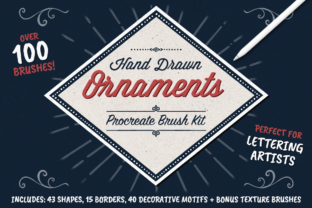
A thorough evaluation of any digital resource requires an inventory of what is included. This particular collection provides a comprehensive suite of over 100 brushes, categorized to facilitate easy navigation and application. The breakdown includes:
- 40 Corner Motif Elements: Essential for constructing custom frames, allowing users to mix and match styles to fit various aspect ratios.
- 15 Borders: Pre-configured linear elements that can be tiled or stretched to enclose content.
- 20 Solid Shape Brushes: Useful for creating backgrounds, masks, or bold graphic statements.
- 23 Shape Outlines: Designed to perfectly fit the solid shape brushes, offering a layered approach to design where fill and stroke can be manipulated independently.
- 5 Bonus Texture Brushes: These add a layer of depth, helping to integrate the crisp digital shapes into more organic or aged compositions.
The inclusion of an Index of Brushes and specific Tips and Tricks further enhances the utility of the pack. For users researching resources, the presence of documentation suggests a thoughtful design process aimed at reducing the learning curve. The installation instructions provided ensure that even those new to importing custom brushes into Procreate can get started quickly.
Comparative Analysis: When to Choose Stamps Over Vectors or Hand-Drawing
When deciding between Shape and Ornament Brushes for Procreate and other methods, several tradeoffs emerge. One common alternative is using vector-based applications like Affinity Designer or Adobe Illustrator on the iPad. While vector tools offer infinite scalability and precise node editing, they often require a steeper learning curve and a different subscription or purchase model. The brush set discussed here offers a middle ground: it provides the visual consistency of vectors but operates within the raster-based, intuitive interface of Procreate.
Another comparison point is hand-drawing ornaments from scratch. While this offers maximum creative freedom, it is time-consuming and requires a high level of illustrative skill to maintain consistency across a project. For example, drawing four matching corners for a frame manually can take considerable time to ensure symmetry and stylistic cohesion. Using the 40 available corner motifs allows a designer to generate endless combinations of vintage frames and borders in minutes. This makes the brush set particularly valuable for freelancers working under tight deadlines or for hobbyists who want professional-looking results without years of practice in ornamental drawing.
However, there are limitations to consider. Because these are stamp brushes, they do not offer the same fluidity as a pen tool. You cannot easily warp a single stamp instance to fit a non-standard perspective without additional transformation steps. Users needing complex, flowing ribbons that twist in 3D space might find dedicated vector tools or advanced warping techniques more suitable. Therefore, the decision to adopt these brushes should be based on the specific requirements of the project: static, repeatable, and modular designs favor this toolset, while dynamic, free-form illustrations may not.
Practical Applications and Workflow Integration
The versatility of these brushes shines in specific scenarios. Consider a wedding invitation designer. They need to create fifty unique variations of a border for different clients. With Shape and Ornament Brushes for Procreate, they can select a corner motif, adjust the color to match the wedding theme, and stamp it onto the canvas. By combining different corners and border segments, they can rapidly prototype layouts. The ability to easily add flourishes and shapes means that a basic layout can be elevated to a high-end design with minimal effort.
Similarly, for social media content creators, these brushes serve as a quick way to brand posts. A consistent frame style can become part of a visual identity. The solid shape brushes can be used to create background overlays or text boxes, while the outline brushes provide definition. The bonus texture brushes allow the creator to distress these clean lines, giving them a worn, vintage look that is currently popular in aesthetic trends.
For educators or workshop leaders creating materials, the clarity of the shape outlines ensures that diagrams and decorative headers remain legible even when resized for handouts or digital slides. The fact that quality is maintained regardless of size changes is a critical technical advantage, preventing the pixelation that often plagues low-resolution clip art.
Making an Informed Decision
Ultimately, choosing the right digital tools involves balancing cost, time, and desired output. The Shape and Ornament Brushes for Procreate are an investment in speed and consistency. They are best suited for:
- Graphic Designers who work primarily in Procreate and need to assemble layouts quickly.
- Illustrators looking to embellish their work with professional-grade details without drawing every element manually.
- Hobbyists who want to create polished crafts, cards, or digital planners with a vintage or ornate aesthetic.
- Users of Older Software who specifically need assets compatible with Procreate 4 and earlier.
If your workflow relies heavily on freehand sketching where imperfection is the goal, or if you require complex vector manipulation for print production at massive scales, you might find other tools more appropriate. However, for the vast majority of iPad-based creatives focusing on branding, stationery, social media graphics, and decorative illustration, this collection offers a robust solution. The inclusion of installation guides and usage tips demonstrates a commitment to user success, ensuring that the transition from standard painting to modular design is smooth.
In conclusion, while no single tool can solve every design challenge, the Shape and Ornament Brushes for Procreate fill a specific and valuable niche. They bridge the gap between the artistic freedom of painting and the structural precision of layout design. By understanding their stamp-based nature and leveraging their extensive library of motifs, users can significantly enhance their productivity and expand their creative possibilities within the Procreate environment.