Mastering Metallic Details: A Practical Guide to Chain Vector Brushes for Jewelry Illustration
In the realm of digital fashion design and jewelry illustration, the difference between a flat sketch and a compelling rendering often lies in the texture and complexity of the metallic elements. Rendering chains, links, and intricate metalwork manually can be a time-consuming process that requires a deep understanding of light, shadow, and perspective. This is where specialized tools like Chain Vector Brushes come into play. Designed specifically to streamline the workflow for both seasoned professionals and emerging designers, these resources offer a bridge between technical precision and artistic fluidity.
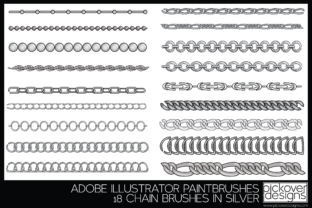
The specific collection featuring 18 fun and easy-to-use vector chain brushes represents a targeted solution for illustrators who need reliability without sacrificing versatility. Unlike standard raster brushes that pixelate when scaled, vector-based tools maintain crisp edges at any magnification, a critical factor when preparing files for print or high-resolution client presentations. Understanding how these brushes function, where they fit into a broader design toolkit, and when they are the appropriate choice over manual drawing is essential for making an informed decision about your digital assets.
Defining the Utility of Vector-Based Chain Tools
At their core, Chain Vector Brushes are pre-programmed stroke paths that replicate the geometry of linked metal structures. What distinguishes this particular set of 18 brushes is their adaptability. In many lower-quality brush packs, the color is baked into the texture, forcing the designer to use complex blending modes or recoloring scripts to achieve a different metal finish. However, a robust vector brush system allows the stroke color to dictate the appearance of the chain entirely.
This means that a single brush path can instantly transform from a cool-toned Sterling Silver to a warm Rose Gold simply by changing the stroke color in your software's palette. The inclusion of pre-configured tints for Silver, Gold, Copper, and Bronze serves as a starting point, but the true value lies in the ability to deviate from these standards. For a designer working on a concept for a new luxury brand, the ability to test a custom alloy color—perhaps a muted antique brass or a highly polished platinum—without redrawing the chain is a significant efficiency booster.
Furthermore, the scalability of these brushes addresses a common pain point in fashion illustration. When detailing a close-up of a clasp versus a long shot of a necklace drape, the line weight must remain consistent with the rest of the illustration. Because these are vector-based, the size of the brush can be easily changed without any loss of fidelity. This ensures that the chain looks intentional and sharp, whether it is wrapping around a wrist in a thumbnail sketch or filling a full-page magazine spread.
Comparative Analysis: Automated Brushes vs. Manual Drawing
When evaluating whether to incorporate Chain Vector Brushes into your workflow, it is helpful to compare them against the traditional method of hand-drawing every link. Manual drawing offers the highest degree of artistic control. An illustrator can distort individual links to show extreme tension, wear, or unique mechanical properties that a standardized brush might not capture. For hyper-realistic technical drawings intended for manufacturing patents, manual construction is often still the required standard.
However, for the majority of fashion illustrations, mood boards, and marketing visuals, the trade-off favors automation. Drawing a realistic curb chain or a rope chain link-by-link can take hours, requiring a meticulous eye for overlapping segments to create a 3D illusion. Chain Vector Brushes automate this overlap logic. The 18 variations included in a comprehensive file typically cover the most common styles used in contemporary jewelry, allowing the artist to focus on the composition, the drape of the fabric, and the overall lighting of the piece rather than getting bogged down in repetitive link construction.
Another alternative is the use of raster (pixel-based) brushes. While these can offer a more painterly, organic feel, they lack the infinite scalability of vector formats. If a client requests a change in the output size of an illustration late in the production process, a raster chain may appear jagged or soft. Vector brushes eliminate this risk, ensuring that the asset remains future-proof regardless of how the final image is utilized.
Evaluating Versatility and Color Dynamics
A key decision factor for many designers is how well a tool integrates with their existing color workflows. The capability of these brushes to change color tints dynamically is a major strength. In a typical project, a designer might be illustrating a collection that features mixed metals. Being able to apply a gold chain brush, duplicate the path, and switch the stroke to copper for a contrasting element saves considerable time.
The inclusion of instructions with the file is also a vital component often overlooked in digital product evaluations. For those just beginning their journey in digital illustration, understanding how to install, activate, and manipulate these brushes within their specific software environment (such as Adobe Illustrator or compatible vector programs) is crucial. Clear documentation reduces the learning curve, allowing the user to move from installation to creation almost immediately. For experienced designers, instructions often reveal advanced settings or pressure sensitivity configurations that unlock the full potential of the tool.
It is important to note, however, that while these brushes are "fun and easy to use," they are not a magic wand for poor design fundamentals. The artist must still understand how light interacts with metal. Even with a perfect vector chain, the illustration will fall flat if the surrounding shadows and highlights do not match the implied light source. These brushes provide the structure; the illustrator provides the realism through shading and context.
Identifying the Right Fit for Your Projects
Determining when to use Chain Vector Brushes versus other methods depends largely on the project's end goal. If you are creating quick sketches for a design meeting, developing concepts for a jewelry line, or producing content for social media where speed and visual impact are paramount, these brushes are an ideal choice. They allow for rapid iteration; you can try five different chain styles on a necklace design in the time it would take to draw one manually.
Conversely, if the project requires a highly stylized, abstract interpretation of jewelry where the chains need to morph into organic shapes like vines or smoke, a standard chain brush might feel too rigid. In such cases, the brush can serve as a base layer to be modified, or the designer may opt to draw freehand. Additionally, if the illustration style is intentionally rough or sketchy with visible construction lines, a clean vector chain might look too polished unless the opacity or blending modes are adjusted to integrate it into the looser style.
The variety of 18 brushes suggests a range of thicknesses and link styles, likely covering everything from delicate anklets to heavy statement necklaces. This breadth makes the pack suitable for a wide demographic of users. A student learning the basics of jewelry design can use them to understand proportion, while a professional illustrator can use them to meet tight deadlines without compromising on the quality of the metallic textures.
Making an Informed Decision
Ultimately, adding Chain Vector Brushes to your library is an investment in workflow efficiency. The distinction between a good tool and a great one often comes down to flexibility and ease of integration. The ability to seamlessly switch between Silver, Gold, Copper, and Bronze, along with the freedom to customize sizes and colors, positions this specific set as a versatile asset for modern digital artists.
Before committing to any digital resource, consider your current bottlenecks. If rendering metal textures slows down your process or if you find yourself avoiding designs with complex chains due to the effort involved, this type of tool is likely the solution. However, always review the included instructions and test the brushes in your specific software environment to ensure they align with your tablet's pressure sensitivity and your personal artistic style. By balancing the speed of automation with your unique creative vision, you can elevate your fashion and jewelry illustrations to a professional standard with greater consistency and less fatigue.