Unlocking Digital Creativity: A Guide to Watercolour Photoshop Brushes and Alphabet Sets
In the rapidly evolving world of digital art and graphic design, the line between traditional media and computer-generated imagery has become increasingly blurred. For many creatives, the challenge lies not in a lack of skill, but in finding the right tools to replicate the organic, unpredictable beauty of hand-painted textures within a digital workflow. This is where specialized assets like Watercolour Photoshop Brushes and comprehensive Alphabet Brushes for Photoshop become indispensable. Whether you are a seasoned illustrator or a hobbyist looking to add a personal touch to your projects, understanding how to leverage these tools can transform your creative output.
The Renaissance of Hand-Painted Textures in a Digital Age
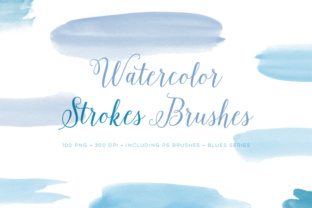
Digital art offers unparalleled convenience, allowing for endless undo buttons and layer management. However, it often suffers from a perceived "sterility." The pixels can look too perfect, lacking the grain, bleed, and variation found in real watercolour paint on paper. This is the primary purpose of high-quality watercolour brushes: to reintroduce that human element into your work.
When you utilize a set designed to mimic real pigments, you are not just stamping an image; you are simulating a physical process. These brushes allow artists to create branding materials, scrapbook layouts, and greeting cards that feel warm and inviting. In modern business and marketing, consumers often crave authenticity. A logo or social media graphic that features a genuine hand-painted touch can stand out against the sea of flat, vector-based designs that dominate the internet.
Why Compatibility Matters for Every User
One of the most significant barriers to entry for digital artists is software compatibility. Many premium brush sets require the latest, most expensive versions of Adobe Photoshop, locking out students and professionals using older, yet fully capable, machines. A truly helpful resource must be accessible. The brush sets discussed here are engineered for broad compatibility, working seamlessly with Photoshop CS2 and up, and even extending back to PS 7.0 and up.
This inclusivity is vital for education and small business owners who may not have upgraded their software suite recently. The technical secret behind this wide compatibility lies in the file dimensions. These brushes are crafted to be below 2500px. By keeping the resolution optimized rather than unnecessarily massive, the files remain lightweight and readable by older engine versions of Photoshop without sacrificing quality on standard canvases. This ensures that whether you are using a decade-old workstation or the latest Creative Cloud subscription, your toolkit remains consistent.
Exploring the Power of Typography: The Alphabet Brush Set
Typography is the voice of your design. While standard fonts offer consistency, they often lack character. This is where a dedicated set of Alphabet Brushes changes the game. Imagine having the ability to paint letters that look as though they were individually brushed onto the canvas, complete with texture and variation, but with the speed of typing.
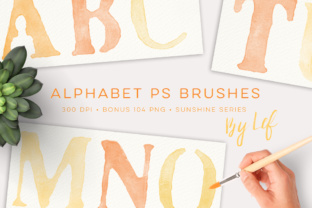
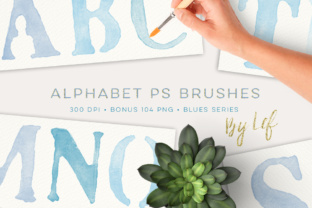
The specific collection highlighted here includes a comprehensive ABR brush file containing all the letters of the alphabet. This single file integration means you do not need to load dozens of individual presets. Once installed, you simply select the brush corresponding to the letter you need (often mapped to keyboard keys or selected via the brush picker) and paint your message. At approximately 1000 pixels tall at 300 DPI, these letters provide substantial resolution. This high DPI (dots per inch) ensures that when you print your designs—whether for wedding invitations, business cards, or product packaging—the edges remain crisp and the texture retains its detail, avoiding the pixelation that plagues low-resolution web graphics.
The Value of the Bonus PNG Collection
While brushes offer dynamic control, sometimes you need immediate, ready-to-use elements. This is why the inclusion of a 104 PNG bonus set is such a significant value add. PNG (Portable Network Graphics) files support transparency, meaning these images can be dragged and dropped directly into any project without a white background interfering with your layout.
This bonus set features the full alphabet in 4 distinct colors, specifically curated in a Blues palette. The choice of blue is strategic; it is a color associated with trust, calm, and professionalism, making it ideal for corporate branding, baby shower announcements, or serene landscape compositions. Having four variations allows for immediate depth. You can layer a dark blue letter over a light blue one to create a shadow effect, or mix them to create a whimsical, multi-toned headline without needing to adjust hue/saturation sliders manually.
For those involved in scrapbooking or making cards, these PNGs act as instant embellishments. You can arrange them to spell out dates, names, or sentiments in seconds, freeing up your time to focus on the broader composition of your artwork.
Practical Applications in Modern Workflows
Understanding the tools is only half the battle; knowing how to apply them is where the magic happens. Here are several ways these assets fit into daily creative activities:
- Branding and Logo Design: Small businesses, particularly in the artisanal, food, and wellness sectors, benefit greatly from organic logos. Using watercolour brushes to create a wordmark gives a brand a boutique, approachable feel that rigid geometric fonts cannot achieve.
- Educational Materials: Teachers and educational content creators can use the alphabet brushes to create engaging worksheets, flashcards, and classroom decorations that capture children's attention more effectively than standard computer fonts.
- Social Media Content: In the age of Instagram and Pinterest, aesthetic consistency is key. The matching blues palette allows creators to maintain a cohesive visual theme across posts, stories, and highlights.
- Print-on-Demand: Entrepreneurs selling t-shirts, mugs, or tote bags can use these high-resolution brushes to create unique designs that appeal to customers looking for "artist-made" goods rather than mass-produced items.
Clarifying Common Misunderstandings
A common assumption among beginners is that using pre-made brushes or PNGs constitutes "cheating" or a lack of artistic integrity. This could not be further from the truth. Just as a traditional painter chooses specific brands of paint or types of canvas to achieve a desired effect, a digital artist curates their brush library to expand their expressive range. These tools are extensions of your creativity, not replacements for it. They handle the tedious replication of texture so you can focus on composition, color theory, and storytelling.
Another misconception is that high DPI files will slow down your computer. As noted earlier, because these brushes are optimized (around 1000px to 2500px), they strike a balance between quality and performance. You get print-ready resolution without bogging down your system, a crucial consideration for those working on laptops or tablets with limited RAM.
Building a Cohesive Creative Ecosystem
The true power of this collection lies in its synergy. When you have matching graphics and brushes available in the same shop, you ensure visual consistency. There is nothing more frustrating than trying to match a brush stroke to a clip-art element that has a slightly different texture or lighting direction. By utilizing a unified set where the alphabet brushes, watercolour splashes, and bonus PNGs share the same DNA, your final pieces look professional and intentional.
Furthermore, the versatility of the Blues palette cannot be overstated. Blue is incredibly adaptable. It pairs beautifully with neutrals like grey and white for a modern look, or with gold and coral for a vibrant contrast. This flexibility ensures that the asset pack remains useful across seasons and trends.
Getting Started with Your New Toolkit
Integrating these tools into your workflow is straightforward. For the ABR brush file, simply go to the Brush preset manager in Photoshop, load the file, and you are ready to paint. For the 104 PNG files, organize them in a folder for easy drag-and-drop access. Experiment with blending modes like "Multiply" or "Overlay" to see how the watercolour textures interact with your background layers.
Whether you are designing a wedding invitation suite, creating a custom nursery wall decal, or developing a brand identity for a startup, these resources provide the foundation for stunning visuals. They bridge the gap between the tactile joy of traditional painting and the efficiency of digital design.
In conclusion, the combination of versatile Watercolour Photoshop Brushes, a complete Alphabet Brush set, and a generous bonus PNG collection represents a powerful investment for any creative individual. By offering broad software compatibility, high-resolution outputs, and a cohesive aesthetic, these tools empower users to produce work that is both technically sound and emotionally resonant. Embrace the texture, explore the typography, and let your digital creations flourish with a distinctly human touch.