Organic Charcoal Brushes for Adobe Illustrator
Digital art often struggles to capture the gritty, unpredictable texture of traditional media. While vector graphics offer precision and scalability, they can sometimes feel too clean or sterile. This is where a dedicated Charcoals Brushes Set for Adobe Illustrator changes the workflow entirely. By integrating these tools, artists and designers can bridge the gap between mathematical perfection and organic imperfection, adding a hand-drawn soul to their digital projects without sacrificing the benefits of vector editing.
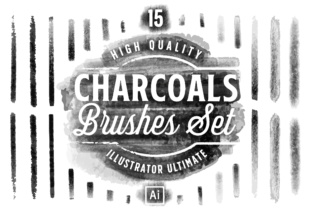
This collection is specifically engineered to bring an authentic painted feel to your work. It includes 15 high-quality charcoal vector brushes available in both AI CS5 and EPS formats, ensuring compatibility across various versions of the software. Whether you are sketching a quick concept or finalizing a client presentation, these brushes provide the necessary depth and texture to make your designs stand out.
Why Texture Matters in Vector Design
The primary value of this set lies in its ability to simulate the physical interaction of charcoal on paper. Traditional charcoal is known for its smudgy, granular appearance, which conveys emotion and rawness. Replicating this digitally usually requires complex layering or raster effects that can bog down a file. However, these vector brushes maintain scalability while delivering that same organic aesthetic.
For many users, the decision to adopt these tools comes down to efficiency versus authenticity. In the past, achieving a charcoal look meant scanning hand-drawn sketches or using heavy Photoshop filters. With this set, the texture is built directly into the brush stroke. This allows for rapid iteration; you can change the color, size, or shape of the stroke instantly while retaining the rough, artistic edge that makes the design feel human.
Perspectives for Different Creators
The utility of a Charcoals Brushes Set for Adobe Illustrator varies significantly depending on who is holding the stylus. What matters to a student differs from what a marketing agency prioritizes.
- Beginners and Hobbyists: For those just starting their journey in digital illustration, the learning curve can be steep. These brushes offer an immediate boost in confidence. Instead of spending hours trying to create custom scatter brushes or download unreliable freebies, beginners get a reliable toolkit right out of the box. The EPS and AI CS5 files mean they can open the set regardless of whether they have the latest subscription or an older perpetual license. The focus here is on ease of use and instant creative gratification.
- Professional Illustrators: Experienced artists often look for flexibility and quality. They need tools that respond predictably but still offer variation. Professionals evaluate this set based on how well the brushes integrate into complex workflows. Can they be modified? Do they scale without pixelation? Since these are vector-based, a pro can expand the appearance and manipulate individual anchor points if needed, offering a level of control that raster brushes cannot match. Their priority is commercial viability and the ability to deliver unique assets to clients quickly.
- Small Business Owners and Entrepreneurs: If you are running a boutique brand or a startup, your visual identity needs to feel personal and approachable. A logo or packaging design created with smooth, perfect lines might feel too corporate. Using charcoal elements can suggest craftsmanship and authenticity. For this audience, the value proposition is about brand differentiation. They may not care about the technical specifics of the brush engine, but rather how the final output resonates with their target customers.
- Educators and Content Creators: Teachers creating tutorials or bloggers designing featured images need visuals that grab attention. Charcoal textures add visual interest to otherwise flat layouts. For educators, these brushes serve as excellent teaching aids to demonstrate how to mix media styles within a single program. The reliability of the file formats ensures that when they share project files with students, everyone can open and edit the work without compatibility errors.
Technical Compatibility and File Formats
A crucial aspect of this collection is its inclusivity regarding software versions. The set provides the 15 charcoal vector brushes in two distinct formats: an AI CS5 file and an EPS file. This dual-format approach addresses a common pain point in the design community: fragmentation.
Many studios and freelancers still operate on older versions of Creative Suite due to budget constraints or specific workflow requirements. By including the CS5 file, the set ensures that users who haven't upgraded to the latest Creative Cloud subscription can still access high-quality tools. Conversely, the EPS format acts as a universal translator, allowing the brushes to be imported into nearly any vector editing software that supports the standard. This flexibility extends the lifespan and usefulness of the product, making it a safe investment for teams with mixed software environments.
Practical Applications Across Industries
Understanding how to apply these brushes helps clarify their value. Here are a few scenarios where this set shines:
- Editorial Illustration: Magazines and online publications often seek artwork that feels editorial and thoughtful. A portrait sketched with these charcoal brushes can convey mood and character better than a flat icon. The graininess adds a layer of sophistication suitable for long-form articles.
- Product Packaging: Artisanal food brands, craft breweries, and organic skincare lines often use textured typography and illustrations to signal "natural" ingredients. Applying a charcoal brush to a label design can instantly communicate a handmade quality that appeals to conscious consumers.
- Storyboarding and Concept Art: In the film and game industries, speed is essential during the ideation phase. Artists can use these brushes to rapidly block out scenes with atmospheric shading. The organic feel helps directors and clients visualize the final tone of a project without getting distracted by overly polished details.
- Social Media Graphics: Marketers need to stop the scroll. Posts featuring textured, hand-drawn elements often perform better because they look less like automated ads and more like genuine content. A blogger could use these brushes to create unique dividers, backgrounds, or accent marks for their posts.
Evaluating the Fit for Your Workflow
Before integrating new assets, it is wise to consider your specific goals. If your primary work involves technical diagrams, architectural blueprints, or data visualization where precision is paramount, a charcoal texture might introduce unwanted noise. However, if your projects involve branding, storytelling, character design, or any field where emotional connection is key, this set offers significant advantages.
Consider the long-term usefulness of the tool. Unlike a trend-specific font or a temporary filter, texture brushes are foundational assets. The style of charcoal drawing has remained relevant for centuries and translates well into modern digital aesthetics. Investing in a high-quality set means you will likely find uses for it years down the line, across different types of projects and evolving design trends.
Ultimately, the Charcoals Brushes Set for Adobe Illustrator is more than just a download; it is a gateway to a more expressive digital practice. It empowers users to break free from the rigidity of perfect vectors and embrace the beautiful messiness of real art. Whether you are a seasoned pro looking to speed up your texturing process or a hobbyist wanting to make your first poster look professional, these 15 brushes provide the organic foundation needed to elevate your creative output.