Evaluating the Set of Citrus Brushes for Adobe Illustrator
In the realm of digital illustration, achieving an organic, hand-painted aesthetic often requires hours of meticulous work. For designers working in Adobe Illustrator, the challenge is even greater: how to maintain the scalability and precision of vector graphics while mimicking the fluid unpredictability of watercolor. This is where specialized assets like the Set of Citrus Brushes for Adobe Illustrator become invaluable. This collection is not merely a set of pre-drawn shapes; it is a functional toolkit designed to bridge the gap between rigid vector lines and the soft, textured look of traditional media. By integrating high-detail citrus motifs—specifically oranges and lemons rendered in a watercolor style—this asset pack offers a pragmatic solution for creators looking to elevate their visual output without sacrificing workflow efficiency.
The Intersection of Vector Precision and Watercolor Texture
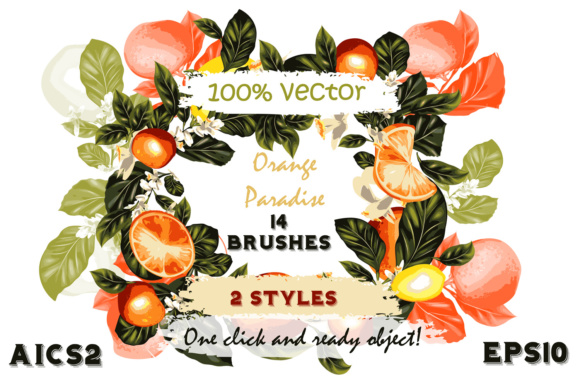
The primary appeal of this brush set lies in its technical execution. Traditional raster brushes in Photoshop can simulate watercolor well, but they lack the infinite scalability required for large-format printing or responsive web design. The Set of Citrus Brushes for Adobe Illustrator addresses this by providing 100% vector-based graphics. Despite being vectors, these brushes are engineered to look like real watercolor paintings, complete with subtle color variations, edge bleeding, and texture that one would expect from wet-on-wet techniques.
What makes this specific collection stand out is the level of detail embedded within each stroke. Unlike simpler pattern brushes that repeat a generic shape, these brushes capture the unique anatomy of citrus fruits. You get distinct representations of lemon slices, orange wedges, and leafy branches that retain their clarity whether scaled down for a business card or enlarged for a billboard. The "high detailed" nature of these brushes means they do not rely on low-resolution textures that might pixelate upon export; instead, they utilize complex vector paths and transparency masks to simulate depth and fluidity.
Workflow Flexibility: Constant vs. Editable Styles
One of the most practical aspects of this toolset is the inclusion of two distinct brush styles, catering to different stages of the design process. The package includes 14 brushes with constant color and editable size, alongside 14 brushes with fully editable color and size. This duality is crucial for professional workflows.
The constant color brushes are ideal for situations where brand consistency is paramount. If you are working within a strict color palette, these brushes allow you to apply the intricate watercolor texture while maintaining a specific hex code. You can resize the branch or fruit element instantly without altering its hue, ensuring uniformity across a marketing campaign. Conversely, the editable color brushes offer creative freedom. They allow designers to shift the tone of a lemon from a bright yellow to a muted ochre, or an orange from vibrant tangerine to a deep sunset red, simply by changing the stroke color in the toolbar. This flexibility reduces the need to create multiple versions of the same asset manually.
Technically, the files are delivered in both Ai (CS2) and EPS10 formats. This ensures broad compatibility, allowing users with older versions of Illustrator to still leverage the assets, while also supporting modern workflows. The fact that there are 28 brushes in total provides a robust variety without overwhelming the library with redundant options.
Real-World Applications Across Industries
The versatility of the Set of Citrus Brushes for Adobe Illustrator extends far beyond simple decoration. Its utility is best understood through specific use cases where organic imagery drives engagement.
- Branding and Packaging: For food and beverage companies, particularly those selling juices, teas, or artisanal goods, these brushes offer an immediate visual cue of freshness. A label design featuring a hand-painted lemon branch created in seconds can convey a "natural" and "craft" identity more effectively than a sterile photograph.
- Event Stationery: Wedding invitations, "save the date" cards, and menu designs often benefit from a softer, romantic aesthetic. The watercolor style fits perfectly with spring and summer themes. Designers can quickly assemble borders or corner accents using the citrus branches, customizing the colors to match the event's theme.
- Textile and Apparel: Because the graphics are vector-based, they are exceptionally well-suited for fabric printing and T-shirt designs. The scalability ensures that the print remains crisp on anything from a small pocket logo to an all-over print on a dress. The organic nature of the watercolor style translates well to fabric textures, avoiding the "digital" look that sometimes plagues screen prints.
- Digital Media and Web: Bloggers and content creators can use these elements to break up text, create custom headers, or design social media graphics that stand out in a feed dominated by stock photography.
Usability and Integration
From a usability standpoint, the installation and deployment of these brushes are straightforward, adhering to the "one-click" promise often made by digital asset creators. The process involves simply opening the provided AI or EPS file, selecting the desired brush swatches, and adding them to your Illustrator brush library. Once loaded, applying the effect is as simple as drawing a line with the Paintbrush Tool.
This ease of use significantly reduces the time spent on asset creation. Instead of sourcing individual clip art images, manipulating them, and trying to blend them into a cohesive composition, a designer can draw a continuous line that automatically generates a complex, textured branch. This streamlining allows professionals to focus more on composition and layout rather than the minutiae of drawing individual leaves or fruit segments.
However, users should be aware that while the brushes are highly detailed, they are still vector constructs. Extremely complex transparency effects used to simulate watercolor can sometimes increase file size or require flattening when exporting to certain legacy formats for print production. It is always advisable to check with your print provider regarding their acceptance of complex vector transparency, although the EPS10 format generally handles these standards well.
Who Benefits Most?
This toolset is particularly beneficial for freelance graphic designers who need to turn around projects quickly without compromising on quality. It is also an excellent resource for small business owners who manage their own marketing materials and may not have advanced illustration skills but want a professional, handmade look. Educators teaching digital design can use these brushes to demonstrate how vector tools can emulate traditional media, providing students with a tangible example of hybrid design techniques.
For illustrators who already possess strong drawing skills, these brushes serve as excellent time-savers for background elements or repetitive patterns, allowing them to dedicate more time to focal points. Meanwhile, marketers will appreciate the consistency the brushes bring to multi-channel campaigns, ensuring that the visual language remains cohesive from a digital ad to a physical flyer.
Final Assessment on Value and Longevity
In evaluating the Set of Citrus Brushes for Adobe Illustrator, the value proposition is clear: it offers a high return on investment through time savings and aesthetic enhancement. The inclusion of both constant and variable color options demonstrates a thoughtful approach to user needs, acknowledging that design projects vary in their constraints. The watercolor style, executed in vector form, solves a persistent problem in the industry, providing the best of both worlds—scalability and soul.
While no single tool can replace the nuance of a human hand painting on paper, this collection comes remarkably close within the digital environment. It is a reliable, flexible, and professionally viable asset that holds up well under scrutiny. For anyone looking to inject a sense of organic warmth into their vector projects, particularly those revolving around nature, food, or lifestyle themes, this brush set represents a practical and effective addition to the creative arsenal. The bonus files included further extend its utility, ensuring that users have comprehensive coverage for various file format requirements. Ultimately, it is a resource that balances artistic flair with technical pragmatism.